Claude Code向けサイトデザインプロンプト実践ガイド
デザインプロンプトは方向を、要件は事実と動作を示します。分けて管理し、参考例の架空の主張を引き継がないようにします。独自の練習は手順を示すもので、全テンプレートの互換性を保証しません。
Neruve 執筆 · 更新日
動くページを出発点に
動く HTML ページをプレビューし、ソースと付属プロンプトを使ってコーディングエージェントで手法を試せます。
Skills は引き続きログイン不要で無料閲覧・コピーできます。テンプレートのプレビューは公開されています。ソースと付属プロンプトのダウンロードにはアカウントと対象の購入権限またはプランが必要です。 ソースの利用条件と料金
小さく確認できる手順
- 対象プロジェクトでClaude Codeを開き、変更前に技術構成、ルート、コンポーネントを確認させます。バックエンドの契約と既存動作を明示します。
- 利用できる参考プロンプトと別の調整用要件を渡します。対象者、目的、文言、素材、主操作、制約を示し、編集前に変更案を求めます。
- 最初の結果をブラウザで確認します。画面サイズと対象箇所を示して具体的な不具合を報告し、限定した修正後に同じ確認を行います。
独自のSaaSとポートフォリオ要件例
これは有料プロンプトとは別にNeruveが作成した架空の要件例です。再現のため英語原文を保持しています。
SaaSデザインプロンプト
Fieldnote is a fictional shared research-notes workspace for small product teams.
Create a calm cream-and-ink landing page. Explain collect → compare → decide.
Show a realistic sample research note, then a three-step workflow.
The primary link is “Explore the workflow” and targets #workflow.
Do not invent logos, testimonials, user counts, security guarantees, pricing,
forms or a working signup flow.
Use semantic HTML, one clear h1, readable contrast and visible keyboard focus.
Support a 390 px mobile view without horizontal overflow and reduced motion.ポートフォリオのプロンプト
Mira Chen is a fictional independent product designer.
Create a warm-neutral portfolio with three clearly labelled fictional projects.
For each project explain the role, constraint and illustrative outcome.
The primary link is “View selected work” and targets #projects.
Do not invent awards, employer logos, real contact addresses or business metrics.
Use semantic HTML, one clear h1, readable contrast and visible keyboard focus.
Support a 390 px mobile view without horizontal overflow and reduced motion.結果の確認項目
390pxのモバイルとデスクトップで、明確な主見出し、読みやすい文字、動くリンク、見えるキーボードフォーカス、横はみ出しがないことを確認します。デモの主張は確認済みの事実に置き換えます。
既存プロジェクト向け Claude サイト改修 Prompt
1つの Hero、既存のコンポーネントライブラリー、元の操作先から始めます。完全な依頼で製品の事実と挙動を守り、Claude Code に具体的な表示改善を依頼します。
これは有料プロンプトとは別にNeruveが作成した架空の要件例です。再現のため英語原文を保持しています。
1. Hero に限定した改修依頼
Improve the hero of this existing website in Claude Code.
Read the current framework, routes, shared components, design tokens and hero source.
Use the project's installed component library; do not add another UI framework.
Goal: make the existing offer and primary action easier to understand.

Before editing, record the hero at 1280, 390 and 320 px. Name the affected files,
the primary action's exact destination and one concrete presentation defect.
Preserve all copy, product facts, prices, route paths, API calls, forms,
authentication, checkout, analytics events, metadata, canonical and hreflang.
Use only supplied or authorized assets. Do not invent social proof or offers.

Propose one scoped change to hierarchy, spacing, typography or image placement.
After the plan is accepted, implement only the hero using existing components.
If a selected frontend design skill is available, read it for design guidance;
the existing project's behavior and this brief remain the protected contract.

Deliver the changed files and before/after screenshots at the same three widths.
Test the original primary link, visible keyboard focus and reduced motion.
Confirm that unchanged URLs, product facts and event names stayed unchanged.
Separate checks actually run from pending checks; report any regression.
Do not publish the site or describe this input as a verified Claude output.
2. 結果を確認して修正
Review the hero change against the original website and brief.
Compare the same 1280, 390 and 320 px views. Follow the original primary action.
Check for horizontal overflow, unreadable text, hidden content and lost focus.
Compare the protected routes, copy, facts, prices, form/API contracts and SEO tags.
If a defect remains, give its selector, viewport, expected behavior and evidence.
Repair only that defect, then repeat the same checks and list the actual results.
If you cannot run the browser or inspect a contract, mark it as pending.
結果と残す証拠
変更ファイル、同じ幅のスクリーンショット、元の操作先、キーボード・モバイル・保持すべき契約の確認結果を残します。確認できない項目は未検証と記録します。
独自の Claude Code 提案入力であり、Claude の実測出力ではありません。タスクに合う Skill を選び、依存関係と製品の事実を確認してください。Taste は独立したコミュニティープロジェクトです。
実際の演習:CodexでFieldnoteを生成
上のFieldnoteのオリジナルbriefをCodexで実行し、出力をすべて保存しました。架空のリサーチノートのページで、同じ要件を別のコーディングエージェントでも検証できます。Claude Codeの試行はログインエラーでページを生成できませんでした。
2026年10月4日、Codex CLI 0.145.0で記録。生成成功は1回、35.92秒、ファイルやシェルのツールは未使用です。CLIはモデル識別子を報告しませんでした。入力・出力・スクリーンショットは英語のままです。
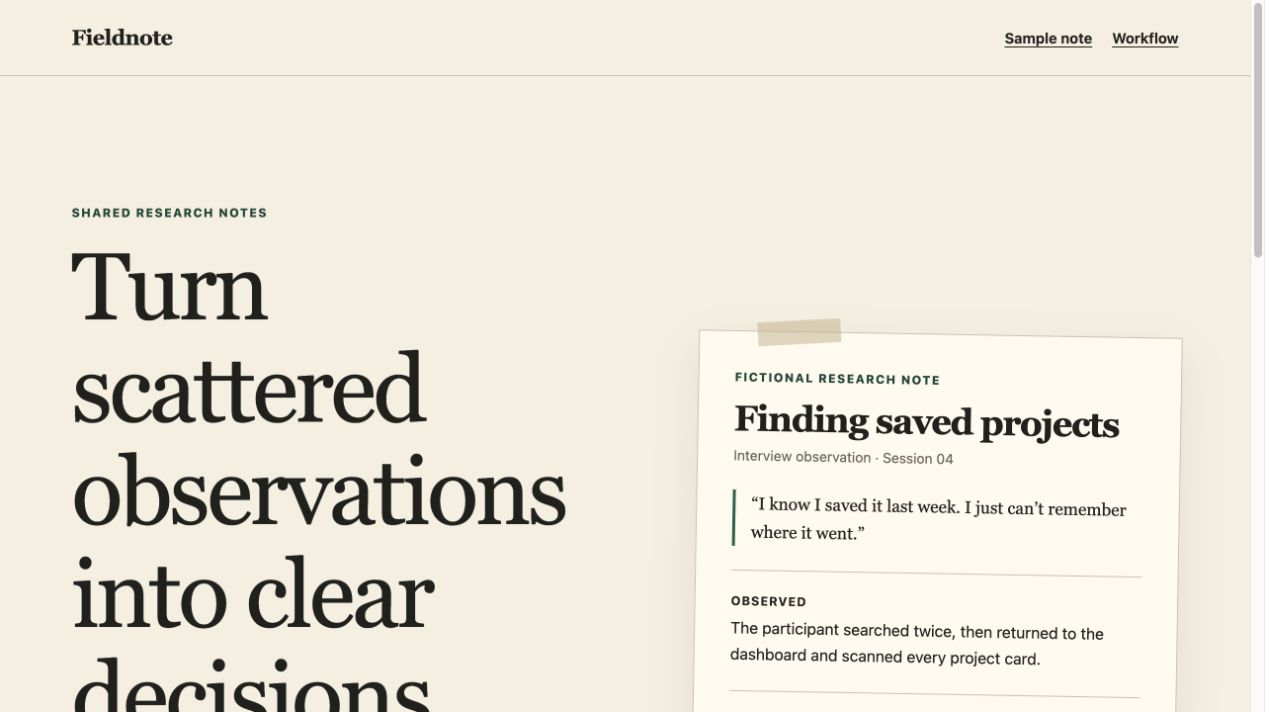
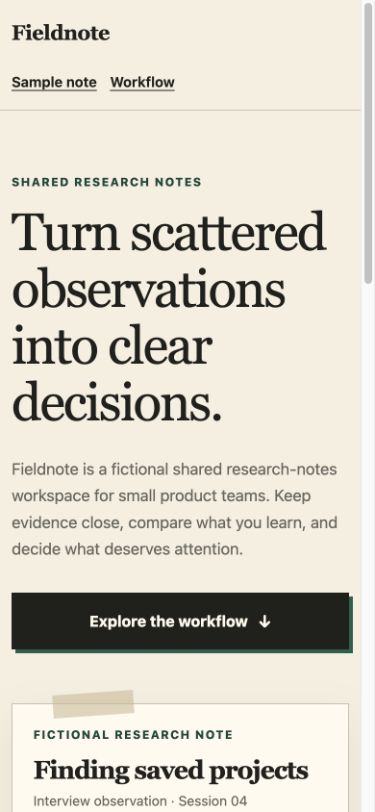
ブラウザーで1280・390・320pxのレイアウト、ワークフローのアンカー、キーボードのスキップリンクを確認しました。h1は1つ、ノートには架空と明記し、登録フォーム・価格・推薦文はありません。文字のコントラストと動きを抑える規則も確認しましたが、完全なアクセシビリティ監査ではありません。
完全な英語入力をダウンロードし、ログイン済みのコーディングエージェントで実行してください。返されたHTMLをブラウザーで開き、同じ幅とリンクを検証します。失敗を記録してから、1回の限定的な修正を依頼します。提供ソースは実際の結果を保存していますが、再実行では見た目が変わる場合があります。
これは単体のHTML/CSS演習であり、Claude Codeの成功例やNeruveの生成サービスのテストではありません。DESIGN.mdやfrontend-design Skillは入力に含めていません。ツールの優位性・登録転換・SEO成長・AI引用の証明にはなりません。
DESIGN.mdとSKILL.mdの役割の違い
GoogleのDESIGN.mdはYAMLのデザイントークンとMarkdownの使用意図を組み合わせ、視覚的なアイデンティティを記述します。Claude Codeにはファイルを読むよう明示してください。自動検出やNeruveのエクスポート対応は保証しません。 現在、形式とCLIはalpha段階であり、変更される可能性があります。
Claude CodeのSkillはfrontmatterと指示を持つSKILL.mdで、再利用できる手順を提供します。導入前に出典、ライセンス、権限を確認してください。デザインファイルは背景、Skillは手順や能力を提供します。
スキルを見つける現在Neruveで利用できるもの
Neruve の公開カタログではサイトのデザイン、利用可能な対応プロンプト、Skills ディレクトリを提供しています。操作可能なプレビューにログインは不要です。対応するプロンプトにはアイテムとプランの利用条件が適用されます。このワークフローでは自分の開発ツールを使うため、公開された Neruve サイト生成機能は必要ありません。
参考は出発点です。結果はモデル、ツール、バージョンで変わり、ファイルとアクセス権は各項目とプランに従います。
プランを見る