Website Design Prompts for Claude Code: A Practical Guide
A website design prompt describes a direction; your brief supplies the facts and behavior. Keep them separate so you can reuse a reference without inheriting its fictional claims. These original exercises demonstrate a workflow, not universal template compatibility.
By Neruve · Updated
Build on a working page
Preview a working HTML page, then use its source and paired prompt to apply these techniques with your coding agent.
Framewise — AI Product Landing Page HTML Template
Practice a clear product story, visual hierarchy and responsive hero.
Preview templateAster Hale — Product Designer Portfolio HTML Template
Adapt the service sections, project stories and contact flow to your own work.
Preview templateSkills stay free to read and copy without signing in. Template previews are public; source downloads and paired prompts require an account and the applicable purchase or plan. View source access and pricing
A small, reviewable workflow
- Open Claude Code in the target project. Ask it to inspect the existing stack, routes and components before suggesting changes. Keep backend contracts and existing behavior explicit.
- Provide the available reference prompt, then a separate adaptation brief. Name the audience, page goal, real copy, assets, primary action and constraints. Ask for a proposed change before editing.
- Inspect the first result in a browser. Report a concrete defect with its viewport and affected section, then request one focused repair and repeat the same check.
Original SaaS and portfolio briefs
This fictional brief is written by Neruve, separate from any paid prompt. Its English text is retained for reproducibility.
SaaS design prompts
Fieldnote is a fictional shared research-notes workspace for small product teams.
Create a calm cream-and-ink landing page. Explain collect → compare → decide.
Show a realistic sample research note, then a three-step workflow.
The primary link is “Explore the workflow” and targets #workflow.
Do not invent logos, testimonials, user counts, security guarantees, pricing,
forms or a working signup flow.
Use semantic HTML, one clear h1, readable contrast and visible keyboard focus.
Support a 390 px mobile view without horizontal overflow and reduced motion.Portfolio design prompts
Mira Chen is a fictional independent product designer.
Create a warm-neutral portfolio with three clearly labelled fictional projects.
For each project explain the role, constraint and illustrative outcome.
The primary link is “View selected work” and targets #projects.
Do not invent awards, employer logos, real contact addresses or business metrics.
Use semantic HTML, one clear h1, readable contrast and visible keyboard focus.
Support a 390 px mobile view without horizontal overflow and reduced motion.What to check in the result
Check a 390 px mobile view and a desktop view. Confirm one clear page heading, readable text, working links, visible keyboard focus and no horizontal overflow. Replace all demonstration claims with verified facts.
A Claude website redesign prompt for an existing project
Start with one hero, the existing component library and the original action. The complete brief protects product facts and behavior while giving Claude Code a concrete presentation task.
This fictional brief is written by Neruve, separate from any paid prompt. Its English text is retained for reproducibility.
1. A scoped hero redesign brief
Improve the hero of this existing website in Claude Code.
Read the current framework, routes, shared components, design tokens and hero source.
Use the project's installed component library; do not add another UI framework.
Goal: make the existing offer and primary action easier to understand.

Before editing, record the hero at 1280, 390 and 320 px. Name the affected files,
the primary action's exact destination and one concrete presentation defect.
Preserve all copy, product facts, prices, route paths, API calls, forms,
authentication, checkout, analytics events, metadata, canonical and hreflang.
Use only supplied or authorized assets. Do not invent social proof or offers.

Propose one scoped change to hierarchy, spacing, typography or image placement.
After the plan is accepted, implement only the hero using existing components.
If a selected frontend design skill is available, read it for design guidance;
the existing project's behavior and this brief remain the protected contract.

Deliver the changed files and before/after screenshots at the same three widths.
Test the original primary link, visible keyboard focus and reduced motion.
Confirm that unchanged URLs, product facts and event names stayed unchanged.
Separate checks actually run from pending checks; report any regression.
Do not publish the site or describe this input as a verified Claude output.
2. Review and repair the result
Review the hero change against the original website and brief.
Compare the same 1280, 390 and 320 px views. Follow the original primary action.
Check for horizontal overflow, unreadable text, hidden content and lost focus.
Compare the protected routes, copy, facts, prices, form/API contracts and SEO tags.
If a defect remains, give its selector, viewport, expected behavior and evidence.
Repair only that defect, then repeat the same checks and list the actual results.
If you cannot run the browser or inspect a contract, mark it as pending.
What to keep with the result
Keep the changed files, screenshots at the same widths, the original action destination and the results of keyboard, mobile and protected-contract checks. Mark anything you could not test as pending.
These are original suggested Claude Code inputs, not recorded Claude outputs. Choose a Skill by task, review its dependencies and preserve the project’s facts. The linked Taste resource is an independent community project.
A real exercise: Fieldnote with Codex
We ran the original Fieldnote brief above through Codex and kept the complete output. This fictional research-notes page shows how the same brief can be checked in another coding agent. Claude Code did not produce a page in our attempted run because it returned a login error.
Recorded on 4 October 2026 with Codex CLI 0.145.0: one successful generation, 35.92 seconds, no file or shell tools used. The CLI did not report the model identifier. Inputs, output and screenshots remain in English.
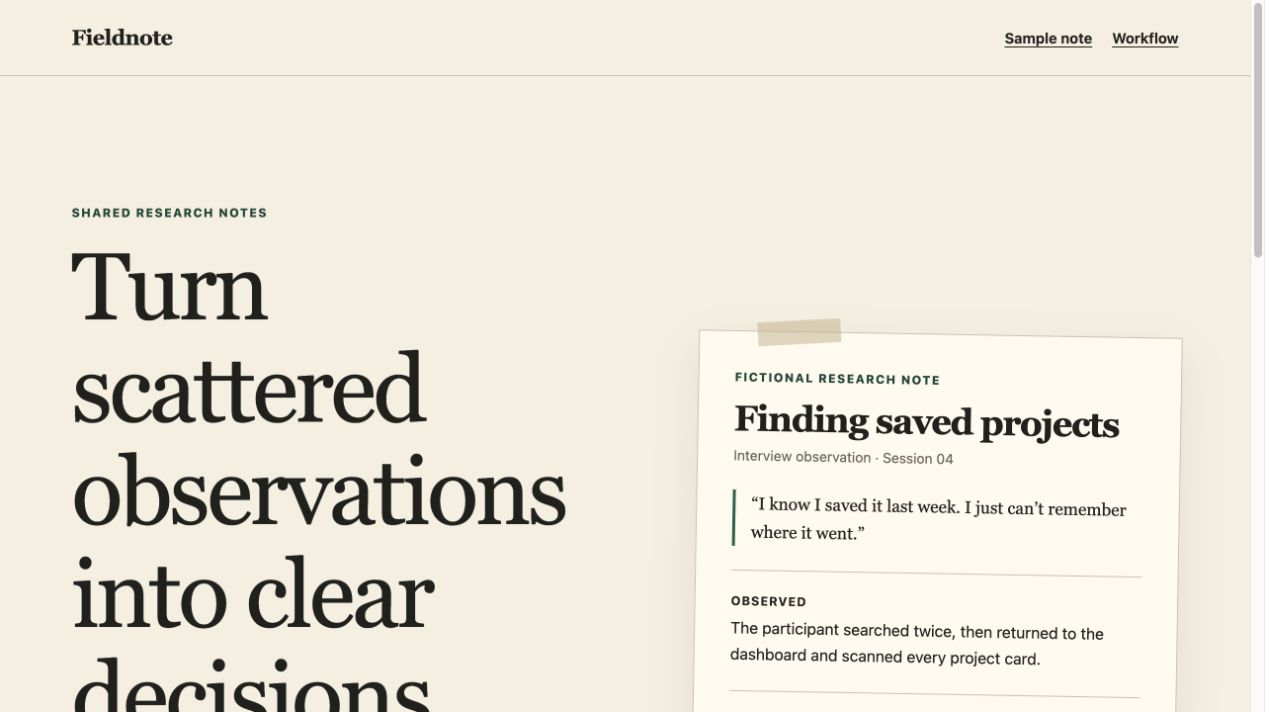
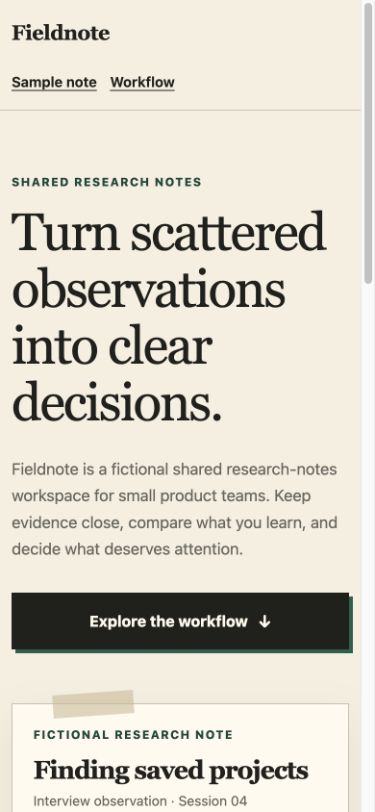
Browser checks covered 1280-, 390- and 320-pixel layouts, the workflow anchor and the keyboard skip link. The page uses one h1 and labels the research note as fictional. It has no signup form, prices or testimonials. Readable contrast and reduced-motion rules were also inspected; this is not a full accessibility audit.
Download the complete English input and run it in an authenticated coding agent. Open the returned HTML in a browser, repeat the same widths and links, and record failures before requesting one focused repair. The supplied source preserves our actual result; another run can look different.
This is one standalone HTML/CSS exercise, not a Claude Code success case or a test of Neruve’s generation service. No DESIGN.md or frontend-design Skill was supplied. The result does not establish tool superiority, signup conversion, SEO growth or AI citations.
DESIGN.md and SKILL.md solve different tasks
Google's DESIGN.md format combines design tokens in YAML with Markdown explaining their intended use. It describes a project's visual identity. To use it as Claude Code context, explicitly ask the agent to read your file; this guide does not claim automatic discovery or Neruve export support. The format and CLI are currently alpha and may change.
A Claude Code skill is reusable task guidance in a SKILL.md file with frontmatter and instructions. Review its source, license and permissions before installation. A design identity file supplies project context; a skill supplies a procedure or capability.
Discover skillsWhat Neruve provides today
Neruve's public catalog offers website designs, available paired prompts and a skills directory. Interactive previews are available without signing in; paired prompts follow the item and plan access rules. This workflow uses your own coding tool and does not require a public Neruve site generator.
A reference is a starting point. Output varies by model, tool and version; files and access remain subject to the item and plan.
View plans